Best IPTV Player for Android TV: A Closer Look at IPTV Panda Player
Finding the best IPTV player for Android TV can be difficult, especially with so many applications offering similar-looking features. A good IPTV player should do more than simply load a playlist. It should be fast, easy to navigate with a television remote, capable of managing large content libraries, and compatible with the features viewers use every day.
IPTV Panda Player is a modern IPTV media player developed for Android TV devices, Android TV Boxes, smartphones, and tablets. It supports M3U playlists and Xtream Codes while offering Live TV, movies, series, Catch-Up, EPG, subtitles, audio-track selection, multiple playlists, parental controls, and several personalization tools.
New users can also test the application through a 7-day free trial before activating a license.
What Is IPTV Panda Player?
IPTV Panda Player is an IPTV media player designed to help users organize and play content from their existing playlist sources.
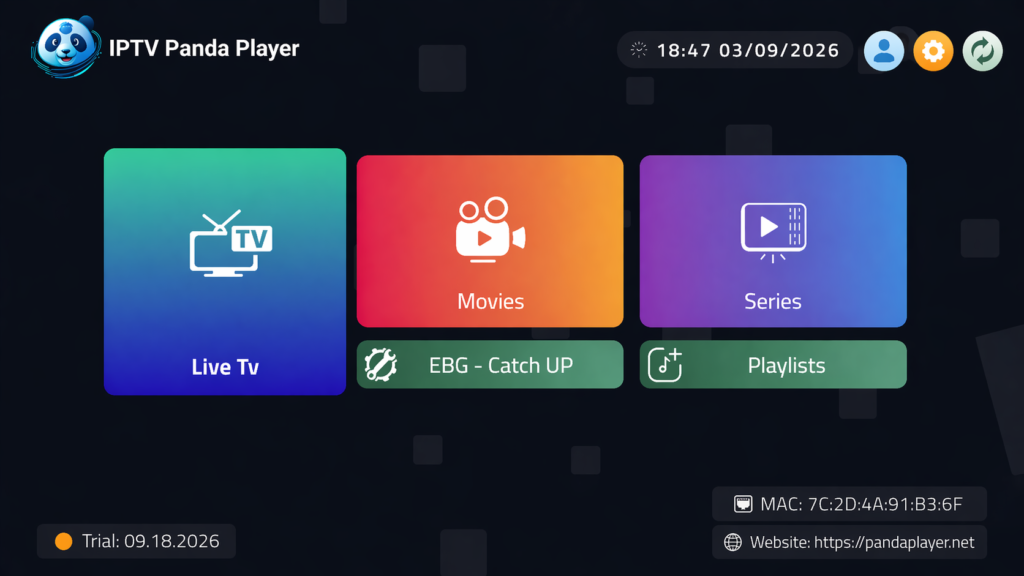
The application combines Live TV, movies, series, Replay, and Catch-Up inside one clean interface. It is optimized for large television screens and remote-control navigation, making it more practical for Android TV than applications designed primarily for touchscreens.
Users can download IPTV Panda Player from Google Play directly on compatible Android TV devices, phones, or tablets.
Why IPTV Panda Player Is a Strong Choice for Android TV
The best IPTV player for Android TV should provide an experience that feels natural on a television. Menus should be easy to navigate, text should be readable from a distance, and commonly used features should not require too many remote-control clicks.
IPTV Panda Player offers:
- A clean and remote-friendly television interface
- Support for M3U and Xtream Codes
- Live TV, movies, series, and Catch-Up
- Multiple playlist support
- EPG and TV Guide
- Favorites and Continue Watching
- Search across different content sections
- Recently Added content
- Automatic next-episode playback
- Subtitles and closed captions
- Multiple audio-track selection
- Category organization and hiding
- Parental controls
- Playlist synchronization
- Multiple interface languages
- Customizable application settings
- A 7-day free trial
These features make IPTV Panda Player suitable for users who want a complete Android TV experience without using multiple applications.
Designed for Android TV and TV Boxes
A mobile IPTV application may technically run on a television, but that does not always mean it provides a good TV experience. Touchscreen layouts can be difficult to control with directional buttons, and small interface elements may not display properly on a large screen.
IPTV Panda Player is optimized for Android TV remote controls. Users can navigate channels, categories, movies, series, settings, and playback options using standard television controls.
Its TV interface includes:
- Clear focus indicators
- Large and readable menu items
- Remote-friendly navigation
- Organized content sections
- Straightforward Back-button behavior
- Fast access to frequently used options
- A layout designed for viewing from a distance
The application also supports Android phones and tablets, allowing users to access a similar experience across different Android devices.
Support for M3U and Xtream Codes
IPTV Panda Player supports two of the most commonly used playlist connection methods.
Xtream Codes
Users can connect a compatible playlist using:
- Server URL
- Username
- Password
After the information is added, the application organizes available content into sections such as Live TV, movies, series, Catch-Up, Favorites, Recently Added, and Continue Watching.
M3U Playlists
The application also supports compatible M3U playlist URLs. This gives users the flexibility to use different playlist formats without installing a separate player for each one.
Playlist information can be entered through the application or managed from the Panda Player website.
Manage Playlists from a Phone or Computer
Typing long server addresses and credentials with a television remote can be inconvenient. IPTV Panda Player solves this problem by providing an online playlist-management page.
Users can open the Panda Player playlist management page, enter the device MAC address and six-digit Device Key, and then add or edit a playlist from a phone or computer.
The page supports both:
- Xtream Codes credentials
- M3U playlist URLs
Users can also give each playlist a nickname, update its information, and refresh it when new content becomes available.
Changes synchronize with the television application, making playlist management much easier than entering long information directly on the TV.
Multiple Playlist Support
Some users manage more than one playlist for different languages, family members, or content libraries.
IPTV Panda Player supports multiple playlists inside one application. Users can add and manage different sources without having to install a separate player for each playlist.
This feature is especially useful for households that want to keep different content libraries organized while still using one familiar interface.
Easy Device Activation
The application offers several convenient activation options, including QR code, Device Key, Device Login, and MAC address verification.
Users who want to activate a device through the website can visit the official IPTV Panda Player activation page.
The online process includes three main stages:
- Enter the device MAC address and email.
- Select the preferred activation plan.
- Complete the payment.
Once payment is confirmed, the application is designed to unlock automatically on the connected device.
The QR code shown inside the application can also make activation faster by opening the relevant page directly on a smartphone.
Seven-Day Free Trial
Choosing an IPTV player without testing it first can be risky because performance and compatibility may vary between Android TV models and playlist sources.
IPTV Panda Player provides new devices with a 7-day free trial. This gives users time to test important features before purchasing an activation.
During the trial, users can check:
- Playlist loading
- Live TV playback
- Movie and series navigation
- EPG information
- Catch-Up availability
- Subtitle support
- Audio-track selection
- Remote-control navigation
- Device performance
- Category management
- Search speed
This trial period helps users confirm that the application works well with their Android TV device and preferred playlist format.
Live TV with EPG and TV Guide

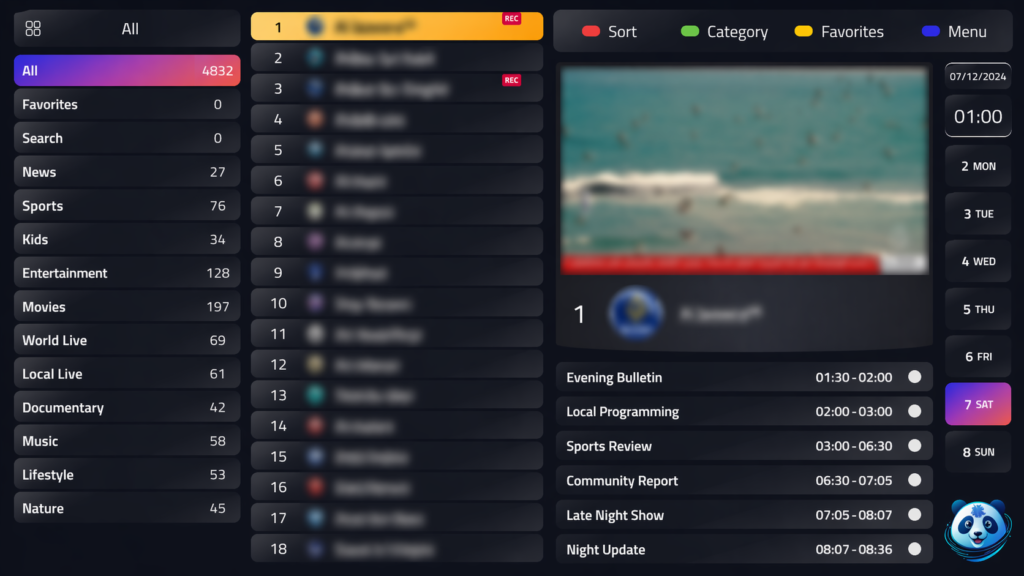
An Electronic Program Guide makes Live TV easier to browse by displaying information about current and upcoming programs.
IPTV Panda Player supports EPG and TV Guide information from compatible playlist sources. Users can view available program details while browsing channels instead of opening each channel individually.
EPG features can include:
- Current program information
- Upcoming programs
- Channel schedules
- Program timelines
- Easier navigation between channels
- Updated guide information after playlist refreshes
The amount and accuracy of the information displayed depend on the EPG data available through the connected playlist.
Catch-Up and Replay Support
Catch-Up allows viewers to return to programs that aired earlier, provided the connected playlist supports this feature.
IPTV Panda Player includes Catch-Up and Replay support for compatible channels. Users can browse available archived programs through the Catch-Up section or supported EPG entries.
This is useful for viewers who miss a live program or want to watch something again without searching through a separate media library.
The availability and duration of archived programs depend on the connected playlist source.
Movies and Series
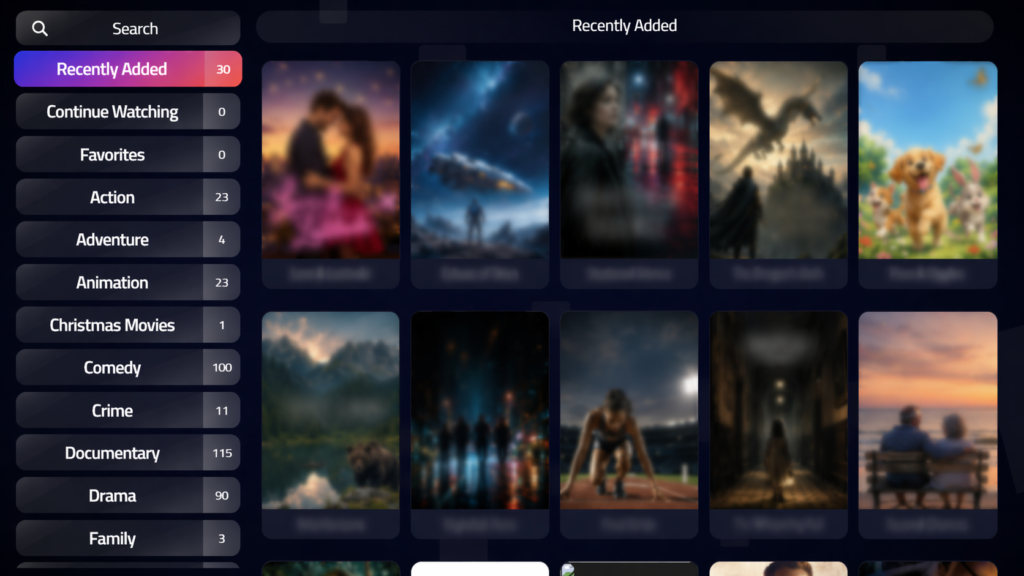
In addition to Live TV, IPTV Panda Player includes separate sections for movies and television series.
Content can be organized using:
- Movie categories
- Series categories
- Seasons and episodes
- Recently Added
- Favorites
- Continue Watching
- Search
- Playback progress
Keeping movies and series separate from Live TV makes large playlists easier to browse.
When information is available through the connected source, the application can display content details such as titles, descriptions, posters, seasons, and episodes.
Continue Watching
The Continue Watching feature helps users resume movies or episodes they have not finished.
Instead of searching for the same title again, users can return to the Continue Watching section and continue close to their previous playback position.
This is especially helpful for:
- Long movies
- Multi-episode series
- Content watched over several sessions
- Households that frequently switch between Live TV and on-demand content
Playback progress provides a more convenient experience and reduces the time spent searching for unfinished content.
Automatic Next Episode
IPTV Panda Player includes automatic next-episode functionality for series.
When an episode finishes, the application can prepare or play the following episode without requiring the viewer to return to the series menu.
This creates a smoother experience for viewers watching several episodes in one session. The feature can be controlled through the application settings based on the user’s preference.
Recently Added
Large movie and series libraries can change frequently. The Recently Added section helps users find newer content without browsing every category.
IPTV Panda Player can organize recently added movies and series into dedicated sections, making it easier to discover updates from the connected playlist.
This feature is particularly useful for playlists containing thousands of titles.
Search Across Live TV, Movies, and Series
Scrolling through a large playlist can take a long time. IPTV Panda Player includes search tools that help users quickly find specific content.
Search can be used across areas such as:
- Live TV channels
- Movies
- Series
- Categories
- Recently added content
This allows users to enter part of a channel, movie, or series name and access matching results more quickly.
Favorites
Frequently watched channels, movies, and series can be added to Favorites.
Instead of searching through the complete playlist every time the application opens, users can create a personalized section containing the content they access most often.
Favorites make the application more efficient, especially for users with very large playlists.
Category Management
Not every category in a playlist is relevant to every viewer. Some playlists contain many languages, regional sections, or categories that a particular household does not use.
IPTV Panda Player provides category-management tools that allow users to:
- Show or hide categories
- Change category order
- Organize content sections
- Reduce unnecessary menu items
- Keep preferred categories easier to access
- Lock selected categories
These tools help create a cleaner interface based on the viewer’s actual preferences.
Parental Controls
The application includes parental-control options for protecting selected content or categories.
Users can lock supported sections using a PIN, helping prevent children or other household members from accessing restricted categories.
When combined with category hiding and organization, parental controls give families more control over how the application is arranged.
Subtitles and Closed Captions
IPTV Panda Player supports subtitles and closed captions when they are available in the connected stream or media source.
During playback, users can select from available subtitle tracks and adjust supported subtitle preferences.
This is particularly useful for:
- Multilingual households
- Foreign-language movies and series
- Viewers who prefer captions
- Content containing several subtitle options
Available subtitle tracks depend on the original content source and the formats supported by the Android device.
Multiple Audio Tracks
Some streams, movies, and episodes include more than one audio option.
IPTV Panda Player allows users to select available audio tracks during playback. This can be helpful when content includes:
- Multiple languages
- Alternative audio versions
- Commentary tracks
- Different supported audio formats
Audio availability depends on what is included in the connected media source.
Multi-Language Interface
IPTV Panda Player is designed for an international audience and supports multiple interface languages.
A multilingual interface makes menus and application settings easier to understand for users in different regions. The application also provides support for right-to-left interface layouts where applicable.
This is valuable for multilingual families using the same Android TV device.
Customizable Settings
Different users prefer different viewing and navigation experiences. IPTV Panda Player includes customizable settings that allow users to adjust the application based on their preferences.
Available options may cover areas such as:
- Playback behavior
- Subtitle appearance
- Audio selection
- Automatic next episode
- Content organization
- Playlist refresh
- Category visibility
- Parental-control settings
- Storage and cache management
- Interface preferences
These controls make the application suitable for both casual viewers and users who want more detailed control over their player.
Playlist Synchronization
Playlists managed through the Panda Player dashboard can synchronize with the connected Android TV application.
This means users can add or update playlist information from a phone or computer and then access the changes on the television.
Playlist synchronization reduces the need to repeatedly enter information using a remote and makes it easier to manage devices from one online interface.
Fast Loading and Local Content Organization
Large IPTV playlists may include thousands of channels, movies, episodes, and categories. A player must be able to organize this information without making navigation unnecessarily slow.
IPTV Panda Player is designed to provide fast loading and smooth navigation while managing large media catalogs.
Performance can still vary depending on:
- Android TV hardware
- Available device memory
- Free storage space
- Playlist size
- Internet connection
- Media resolution
- Video and audio formats
- Source-server performance
The application also includes storage and cache controls that can help users manage app data directly through the settings.
4K UHD Playback
IPTV Panda Player supports high-resolution playback, including 4K UHD content on compatible devices and sources.
Successful 4K playback depends on several factors:
- The Android TV or TV Box must support 4K output.
- The connected display must support the selected resolution.
- The media source must provide 4K content.
- The device must support the required video codec.
- The internet connection must be fast and stable enough.
When these requirements are met, viewers can use IPTV Panda Player for high-resolution content on a compatible Android TV setup.
Clean and Simple Interface
An application can offer many features while still being difficult to use. IPTV Panda Player aims to keep its main interface clean and organized.
Live TV, movies, series, Favorites, Catch-Up, and other sections are separated clearly, helping users reach the content they want without navigating through complicated menus.
This balance between advanced features and simple navigation is one of the main reasons IPTV Panda Player stands out among Android TV players.
How to Install IPTV Panda Player on Android TV
Installing the application on a supported Android TV device is straightforward:
- Open Google Play Store on the Android TV device.
- Search for “IPTV Panda Player.”
- Select the application published by PAL SMARTERS.
- Choose Install.
- Open the application after installation.
- Note the device information displayed inside the app.
- Add a compatible playlist through the application or online dashboard.
- Test the available features during the 7-day free trial.
Users can also open the official IPTV Panda Player Google Play listing from a browser and select a compatible device connected to their Google account.
How to Add a Playlist
A playlist can be managed through the online dashboard by following these steps:
- Open Panda Player’s playlist management page.
- Enter the MAC address displayed in the application.
- Enter the six-digit Device Key from the Profile page.
- Select Xtream or M3U.
- Give the playlist a recognizable nickname.
- Enter the required playlist information.
- Save the playlist.
- Return to the Android TV application and refresh if necessary.
The same page can later be used to edit or refresh existing playlists.
How to Activate the Application
After completing the trial, users can activate the connected device through the official activation page:
- Visit the IPTV Panda Player activation page.
- Enter the device MAC address.
- Enter an email address for confirmation and purchase information.
- Select an available plan.
- Complete the payment.
- Reopen or return to the application.
The device should recognize the activation after the payment is confirmed.
Technical Support
Users who need help with installation, activation, playlist management, or another technical issue can use the official Panda Player contact page.
When contacting support, it is useful to include:
- Device type and model
- Android version
- Device MAC address
- Application version
- A clear description of the problem
- Any error message displayed
- The steps already attempted
Providing complete information can help the support team identify the issue more efficiently.
IPTV Panda Player Features at a Glance
Here is a summary of the application’s main features:
- Android TV, Android phone, and tablet support
- Remote-friendly Android TV interface
- M3U playlist support
- Xtream Codes support
- Multiple playlists
- Online playlist management
- QR code activation
- Device Key and Device Login
- Live TV
- Movies
- Series
- Catch-Up and Replay
- EPG and TV Guide
- Favorites
- Continue Watching
- Playback progress
- Automatic next episode
- Recently Added
- Search
- Subtitles
- Closed captions
- Multiple audio tracks
- Category management
- Category hiding and organization
- Parental controls
- Playlist synchronization
- Multiple interface languages
- Customizable settings
- Storage and cache management
- 4K UHD playback on compatible devices
- Fast loading
- Clean interface
- Seven-day free trial
Frequently Asked Questions
Is IPTV Panda Player available on Google Play?
Yes. IPTV Panda Player is available through its official Google Play page for compatible Android TV devices, phones, and tablets.
Does IPTV Panda Player work on Android TV Boxes?
The application is designed for Android TV and compatible Android-based devices. Compatibility may vary depending on the Android version, available memory, hardware-decoding support, and device manufacturer.
Does IPTV Panda Player support M3U playlists?
Yes. Users can add compatible M3U playlist URLs through the application or the online playlist-management page.
Does it support Xtream Codes?
Yes. IPTV Panda Player supports compatible Xtream Codes connections using a server URL, username, and password.
Can multiple playlists be added?
Yes. The application supports multiple playlists, allowing users to organize more than one compatible content source.
Does IPTV Panda Player include an EPG?
The application supports EPG and TV Guide information when compatible program data is available from the connected playlist.
Does it support Catch-Up?
Yes. Catch-Up and Replay are supported for compatible channels and playlist sources.
Can users add subtitles?
The player supports available subtitles and closed-caption tracks included with compatible streams and media files.
Can the audio language be changed?
Users can select from available audio tracks when the connected media contains multiple audio options.
Does it remember playback progress?
IPTV Panda Player includes Continue Watching and playback-progress features for supported movies and series.
Is there a free trial?
Yes. New devices receive a 7-day free trial that allows users to test the application before activation.
Where can users manage playlists?
Playlists can be added, edited, and refreshed through the official Panda Player playlist dashboard.
Where can users activate the application?
Device activation can be completed through the official Panda Player activation page.
How can users contact support?
Users can submit a support request through the official Panda Player contact page.
Final Verdict: Is IPTV Panda Player the Best IPTV Player for Android TV?
IPTV Panda Player is a feature-rich option for anyone searching for the best IPTV player for Android TV.
It combines M3U and Xtream Codes compatibility with multiple playlists, Live TV, movies, series, EPG, Catch-Up, Favorites, Continue Watching, subtitles, audio-track controls, parental controls, category management, and online playlist synchronization.
Its clean interface and television-remote optimization make it particularly suitable for Android TV and compatible TV Box devices. The 7-day free trial also gives users an opportunity to test compatibility and performance before completing an activation.
Those interested in trying the application can visit the official IPTV Panda Player website or download IPTV Panda Player from Google Play.
Related posts

Try IcelandIPTV for 24 Hours – Just $1!
Try IcelandIPTV for 24 Hours – Just $1! Are you curious about how IPTV works or what kind of entertainment you can enjoy with Icela …

IPTV in Iceland: Affordable Entertainment for the Whole Family
IPTV in Iceland: Affordable Entertainment for the Whole Family Finding entertainment that suits everyone in the family can be chall …